Landlord Playbook
A landlord broker’s lease redline workflow: from tenant comments to owner decisions
By CRE Redline··5 min read
Organize a tenant’s returned lease into owner decisions, counsel questions and unresolved points. A practical workflow with a fictional issue example.
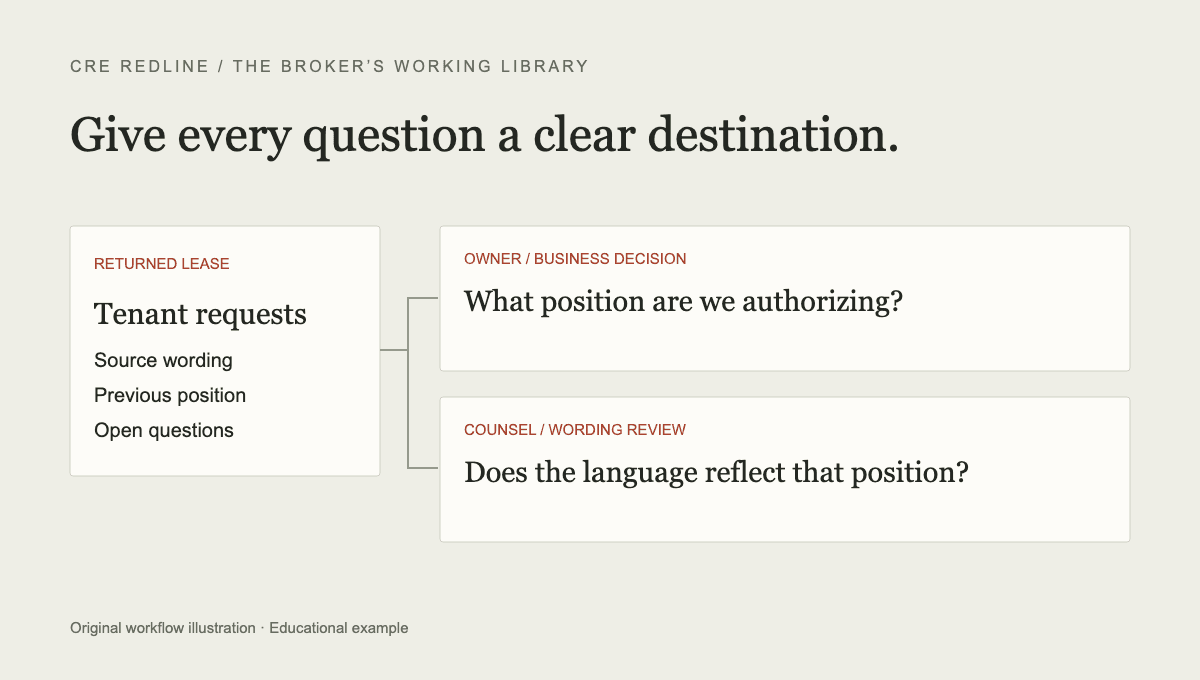
A landlord broker’s useful output from a returned lease is a clear business decision list: what the tenant requested, what the owner needs to decide, what counsel needs to resolve and what remains unanswered. Treating every edit as an owner decision wastes attention; treating every edit as a legal issue can hide the business choices.
This guide proposes a repeatable administrative workflow. It does not establish legal authority, approval rights or customary lease positions. Confirm the actual decision makers and counsel’s role for the transaction.
Establish the draft and the review scope
Save the returned document with its received date and sender. Identify which version it answers. Keep the marked copy, clean copy and exhibits distinguishable. If a document arrived through several people, do not assume the sender authored or approved every mark.
If the tenant sends a clean Word file, compare it against the intended prior version. Microsoft documents the original-and-revised process in its Word comparison guide. A difference list is a starting point; the surrounding clause and referenced documents still matter.
Record whether the review covers this round’s edits or the full signing set. The final signing checklist describes a separate verification task when the negotiation approaches execution.
Sort the questions by who can answer them
An owner business decision might concern the amount of an allowance, a rent proposal or whether a concession fits the economics of the deal. A counsel question might concern how the chosen position is expressed or how an exception interacts with another provision. An operational question might need construction, property management or accounting input.
These are working categories, not exclusive legal boundaries. Some issues require all three. The broker’s role in this record is to make the handoff specific: identify the source, the requested decision and the person responsible for obtaining an answer.
Avoid status labels that conceal uncertainty. “With counsel” does not explain whether counsel is waiting for an owner decision. “Approved” does not explain who approved it or whether the corresponding language has been incorporated.
Work one issue all the way through
Consider a fictional allowance negotiation. A prior version includes $30 per rentable square foot, while the tenant’s returned draft requests $45. The confirmed edit is a $15-per-square-foot increase. The owner may need to decide an amount, while the construction team checks eligible work and counsel checks the payment conditions.
Record the issue as “Improvement allowance — amount and disbursement conditions.” Quote the relevant allowance sentence and identify the work letter. Ask the owner for the proposed amount. Ask the appropriate reviewer to confirm timing and conditions. Do not mark the entire issue resolved after only the amount is approved.
If the questions will move at different speeds, create separate entries linked to the same clause: one for the amount and another for the disbursement conditions. The allowance checklist provides additional business-review prompts.
Keep the prior offer separate from the next proposal
An issue log should distinguish the wording currently in the draft, the last position actually communicated, an internal proposed response and any confirmed agreement. Combining these into one “current position” field can cause a draft suggestion to be mistaken for an offer already made.
For each material point, keep the latest source, a short history and a next action. If the owner authorizes one amount and counsel later revises another condition, retain both decisions with their scope. A timestamp and a named source are more useful than an unexplained green status.
Use the negotiation issue-log worksheet as a starting record. Adapt its fields to the transaction rather than assuming the template covers every approval requirement.
Send an owner update that requests decisions
Lead with the decisions needed to move the response forward. Then identify unanswered questions and the next planned step. A long list of textual edits can accompany the update, but should not obscure the owner’s decision list.
For the fictional allowance example, the update could say: “The tenant has requested $45/SF in place of $30/SF. Please confirm the amount you want to propose. We are separately checking eligible costs and payment timing in the work letter before the response is finalized.”
That wording distinguishes the tenant’s request from the owner’s response. Use the free client update builder to organize your notes, or see the worked update template.
Reconcile the next returned round
When the next document arrives, revisit the existing issue log before creating a second one. Identify whether each point changed, repeated or received no new marks. Repeated wording and silence do not prove agreement. Verify the response before marking the issue resolved.
CRE Redline supports this review-to-response workflow for either side of a lease. The broker checks interpretations and keeps the open issues current. Counsel should review the legal implications and final language. The value to test is less repeated administrative work with a clearer decision record, not a promise that software closes the transaction.
Put your next round through it
CRE Redline reads every tracked change out of the Word file itself, explains what each one does in plain English, and keeps a running list of what is still open. Round 1 of every deal is free, no card required.
Analyze your first round freeKeep reading
This article is general information, not legal advice. Review lease language with qualified counsel. See our editorial standards and corrections process.